
An SQL Tutorial
Ok, every tutorial always starts out with a "what is" section... so, not to make waves...
What is SQL - SQL stands for Structured Query Language. For the purposes of Epoch Star, and it's .dat
data files SQL is a language that can be used to retrieve and query data
from the Epoch Star config files using SQLite. SQLite
is a version of SQL used by the Epoch Star engine to store and retrieve game
data.
What can I do with SQL - Using SQLiteCC, you can use the SQL Language to update, create, or delete objects, weapons, missions, devices, player data, or just about anything else within the Epoch Star game.
TABLES, ROWS, and COLUMNS - Databases that use SQL organize their data into Tables. Within those tables are rows and columns. A table will usually be a type of something (I know I'm being real specific here) within the game. For instance, in the pe.dat file, there is a table called "player". This table stores all the player characters you have created (and not deleted) while playing Epoch Star.
Let's take a look, shall we?

Oooo... exciting stuff. This makes me wonder why I left the mortgage business and started writing video games. Ok then, back to the tutorial.
As you can see, this table has two rows in it. The reason is I have created two player ships in my game. There are many columns that you can not see because not all of the columns in the player table will fit across my screen for the screen shot, but of the ones you can see, you'll notice that one of the columns is "credits". This is the number of credits that a particular player ship has in the game. Well, it looks like the first ship has WAY more money than the second ship... and that's not really fair now is it? So, being the semi-socialist left wing turkey that I am, I'm going to level the playing field by executing the following statement:
UPDATE player SET credits = 10000;
Type that update statement into the query window, execute it and voila! Both the first and the second player now have $10000. A much more equitable situation.
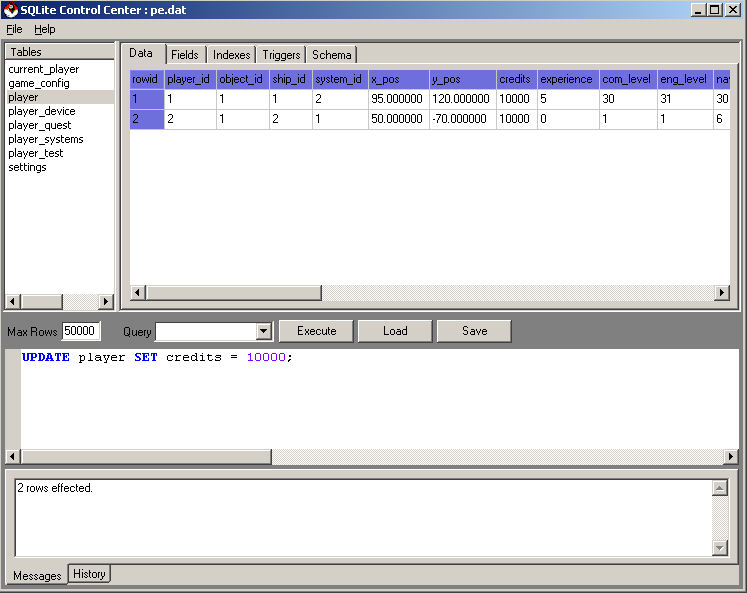
This was about as simple an update statement as you can get. So, how did it work?
UPDATE player SET credits = 10000;
The UPDATE means that you are changing rows that already exist in the table. Immediately after UPDATE you give the table name (in this case player). After the table you are updating, you use the keyword SET followed by the <column> = <value>.
So a very basic UPDATE statement looks like this:
UPDATE <table> SET <column> = <value>;
Well, what if I don't want to update every row in the table. Don't worry, we'll get to that, but next we'll discuss the SELECT which will show us how to retrieve data.
Continue to SELECT statement tutorial
Next >>
©2005 Battleline Games
Contact Us: Support@EpochStar.com