
An SQL Tutorial Part 2 - SELECT
The SELECT statement is used to retrieve data from tables in a database such as SQLite. SQLiteCC has a GUI interface that allows you to view all of the data in a table, which is really nice and reduces the amount you have to use SELECT statements when modifying Epoch Star, but it is frequent that you want to look at all of the data with certain attributes in a table. This is where the WHERE clause helps you out. The WHERE clause is used to filter results returned from a SELECT query to only certain values. We will discuss this later, but for now lets cover the basics.
Lets again take a look at the player table in the pe.dat file.

There are too many columns in the player table to show them all in one screen. To ameliorate this, we can use a select statement that only returns certain values.
SELECT character_name, player_id, credits, level FROM player;
When you write a SELECT statement, it begins with the word SELECT followed by a list of comma seperated columns followed by the word FROM and lastly the table your selecting from.
SELECT <columns> FROM <table>
Here's what it looks like when we execute the statement we had above:

Notice that the only columns we see are character_name, player_id, credits, and level. These are the columns we specifically mentioned in the SELECT statement.
The WHERE Clause - Most of the time you don't want to perform an action on all of the rows in a table. The WHERE clause allows you to only perform a query on rows that have columns with particular attributes. Looking again at the player table, we don't really care about the ship we named 'Rick B'. Much more interesting is the ship named 'George Lucas'. Because of this, we only want to select the row where player_id = 1. So, below is the first query we'll write that uses the WHERE clause.
SELECT * FROM player WHERE player_id = 1;
The * character following the SELECT indicates that you want the query to return every column in the table.
Note: In most environments that support SQL, you would be able to do the following "SELECT * FROM player WHERE character_name = 'George Lucas';". Unfortunately, SQLiteCC appears to have a bug that prevents you from selecting with character fields in the WHERE clause.
Lets take a look at the results of the query:
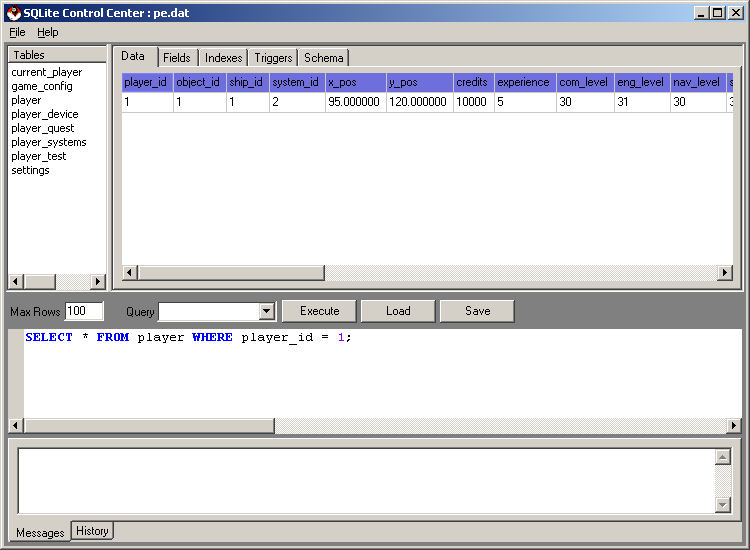
The only row returned is the ship where the player_id is 1 (George Lucas).
Continue to the Advanced UPDATE statement tutorial
©2005 Battleline Games
Contact Us: Support@EpochStar.com